

What the AI receptionist knows and may do
Who can do this: Owners and Office Managers.
Go to Settings → Patients and AI → AI receptionist, and pick the office at the top right.
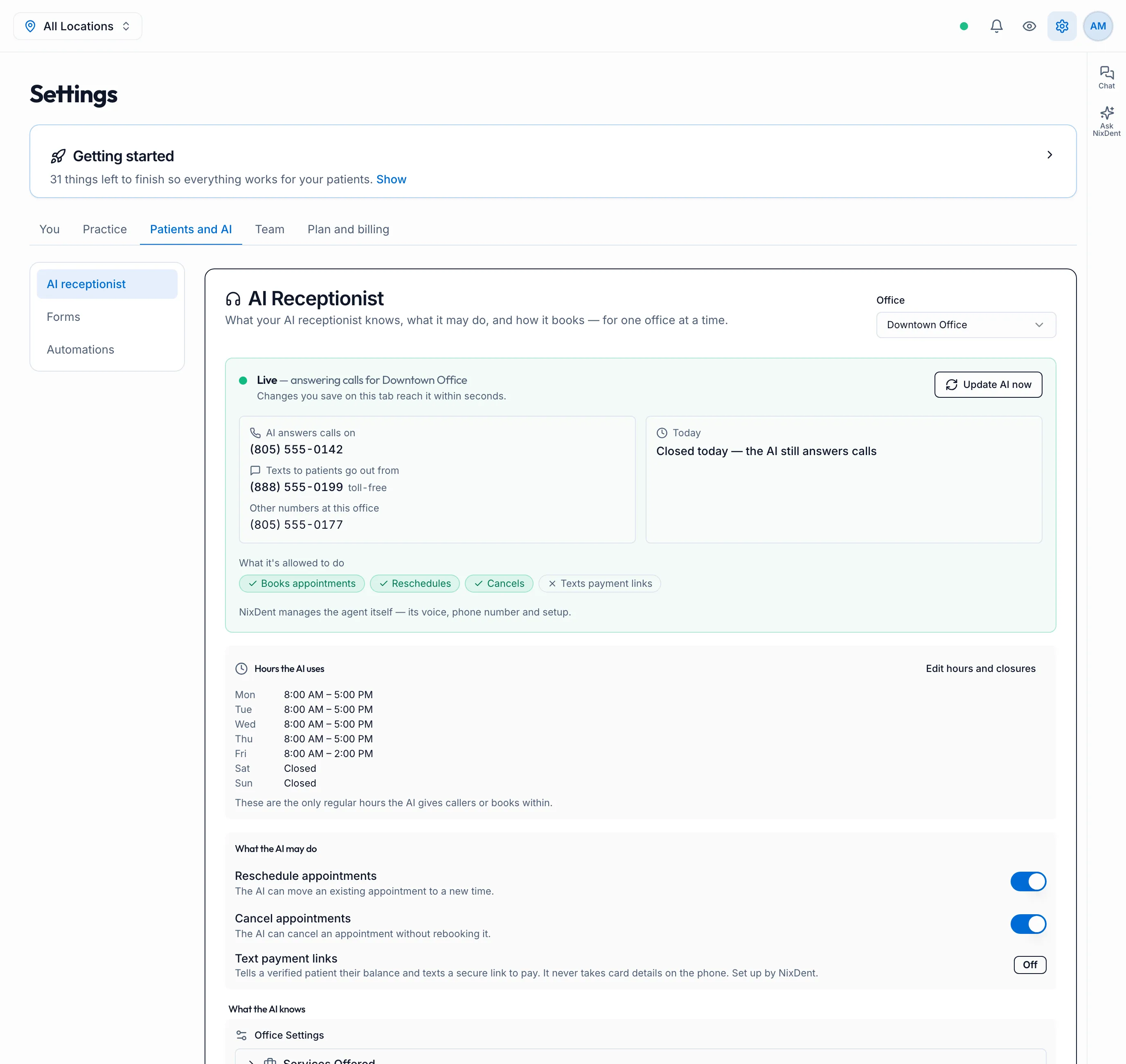
At the top: is it live?
Section titled “At the top: is it live?”The green box shows whether the AI is Live for this office, and:
- AI answers calls on: the number that rings the AI.
- Texts to patients go out from: your texting number.
- Today: whether the office is open today. The AI answers calls either way.
- What it’s allowed to do: a quick summary of the switches below.
Changes you save on this page reach the AI within seconds. If something you changed isn’t showing up on calls, click Update AI now.
NixDent manages the agent itself: its voice, phone numbers and setup. Use Request for those.
Hours the AI uses
Section titled “Hours the AI uses”These are the hours from Hours and closures, shown here so you can check them. Click Edit hours and closures to change them. Don’t type hours or holidays anywhere else, because two different lists can contradict each other.
What the AI may do
Section titled “What the AI may do”- Reschedule appointments: move an existing appointment to a new time.
- Cancel appointments: cancel without rebooking.
- Text payment links: tell a verified patient their balance and text a secure link to pay. It never takes card details on the phone. NixDent sets this up.
The AI always books new appointments. It only books in the rooms and with the providers in Booking rules.
What the AI knows
Section titled “What the AI knows”Fill in each section: Services Offered, Practice Highlights, Languages Spoken, Insurance & Payment, Payment Options and Office Policies. Each has a notes box for anything the list doesn’t cover:
- More about your services
- More about insurance and payment, and the new patient insurance notice. For example: “Just so you know, we are out of network with most plans.”
- More about office policies
- Under How the AI talks to callers: the greeting, frequently asked questions with the answers you want given, and other information such as parking and directions.
Click Save once at the bottom to save everything.